
Cloudflare Agents SDK vs OpenAI Agents SDK (Python)
In short
Cloudflare Agents SDK vs OpenAI Agents SDK (Python): both are coding tools on Scriptiii AI Tools. Cloudflare Agents SDK pricing: Free. Free to use. (reported by the maker) OpenAI Agents SDK (Python) pricing: Free. Free to use. (reported by the maker) Both have 0 upvotes.
- Cloudflare Agents SDK
- Free. Free to use. (reported by the maker)
- OpenAI Agents SDK (Python)
- Free. Free to use. (reported by the maker)
- Upvotes
- 0 vs 0
| Field | Cloudflare Agents SDK | OpenAI Agents SDK (Python) |
|---|---|---|
| Page | Cloudflare Agents SDK | OpenAI Agents SDK (Python) |
| Pricing (maker-reported) | Free. Free to use. | Free. Free to use. |
| Upvotes | 0 | 0 |
| Best for | ai-agents, framework, agent-sdk | ai-agents, framework, agent-sdk |
| Tagline | SDK for building stateful AI agents on Cloudflare Workers and Durable Objects. | Lightweight OpenAI framework for multi-agent workflows with handoffs, guardrails and tracing. |
| Website | Visit Cloudflare Agents SDK | Visit OpenAI Agents SDK (Python) |
Pricing and pricing details come from the maker's submission. They are not independently verified.
Cloudflare Agents SDK
Cloudflare Agents
Agents are persistent, stateful execution environments for agentic workloads, powered by Cloudflare Durable Objects. Each agent has its own state, storage, and lifecycle — with built-in support for real-time communication, scheduling, AI model calls, MCP, workflows, and more.
Agents hibernate when idle and wake on demand. You can run millions of them — one per user, per session, per game room — each costs nothing when inactive.
npm create cloudflare@latest -- --template cloudflare/agents-starter
Or add to an existing project:
npm install agents
Read the docs — getting started, API reference, guides, and more.
Quick Example
A counter agent with persistent state, callable methods, and real-time sync to a React frontend:
// server.ts
import { Agent, routeAgentRequest, callable } from "agents";

export type CounterState = { count: number };

export class CounterAgent extends Agent<Env, CounterState> {
  initialState = { count: 0 };

  @callable()
  increment() {
    this.setState({ count: this.state.count + 1 });
    return this.state.count;
  }

  @callable()
  decrement() {
    this.setState({ count: this.state.count - 1 });
    return this.state.count;
  }
}

export default {
  async fetch(request: Request, env: Env, ctx: ExecutionContext) {
    return (
      (await routeAgentRequest(request, env)) ??
      new Response("Not found", { status: 404 })
    );
  }
};
// client.tsx
import { useAgent } from "agents/react";
import { useState } from "react";
import type { CounterAgent, CounterState } from "./server";

function Counter() {
  const [count, setCount] = useState(0);

  const agent = useAgent<CounterAgent, CounterState>({
    agent: "CounterAgent",
    onStateUpdate: (state) => setCount(state.count)
  });

  return (
    <div>
      <span>{count}</span>
      <button onClick={() => agent.stub.increment()}>+</button>
      <button onClick={() => agent.stub.decrement()}>-</button>
    </div>
  );
}
State changes sync to all connected clients automatically. Call methods like they're local functions.
The agent is a Durable Object, so it needs a binding and a SQLite migration in wrangler.jsonc:
{
  "name": "counter",
  "main": "server.ts",
  "compatibility_date": "2026-06-11",
  "compatibility_flags": ["nodejs_compat"],
  "durable_objects": {
    "bindings": [{ "name": "CounterAgent", "class_name": "CounterAgent" }]
  },
  "migrations": [{ "tag": "v1", "new_sqlite_classes": ["CounterAgent"] }]
}
Features
| Feature | Description |
|---|---|
| Persistent State | Syncs to all connected clients, survives restarts |
| Callable Methods | Type-safe RPC via the @callable() decorator |
| Sub-agents | Parent/child DO composition via facets, nested routing, and typed parent lookup |
| Agent Tools | Run chat-capable sub-agents as tools with streaming child timelines |
| Scheduling | One-time, recurring, and cron-based tasks |
| WebSockets | Real-time bidirectional communication with lifecycle hooks |
| AI Chat | Message persistence, resumable streaming, server/client tool execution |
| MCP | Act as MCP servers or connect as MCP clients (HTTP, SSE, RPC, elicitation) |
| WebMCP | Expose page-local tools or bridge remote MCP tools to browser agents |
| Workflows | Durable multi-step tasks with human-in-the-loop approval |
| Send, receive, and reply via Cloudflare Email Service | |
| Voice | Continuous STT, streaming TTS, VAD, interruption, SFU utilities |
| Browser Agents | Run agents in the browser tab with agents/browser |
| Code Mode | LLMs generate executable TypeScript instead of individual tool calls |
| Sandboxed Execution | Run generated code inside an isolated Worker with a virtual filesystem |
| x402 Payments | Pay-per-call APIs and tools via the x402 protocol |
| Observability | Built-in tracing, metrics, and structured logs |
| SQL | Direct SQLite queries via Durable Objects |
| React Hooks | useAgent, useAgentChat, useVoiceAgent for frontend integration |
| Vanilla JS Client | AgentClient and VoiceClient for non-React environments |
Packages
| Package | Description |
|---|---|
agents | Core SDK — Agents, routing, Voice, Channels, scheduling, MCP, workflows, x402, browser agents |
@cloudflare/ai-chat | Higher-level AI chat — persistent messages, resumable streaming, tool execution |
@cloudflare/think | Opinionated chat agent base — agentic loop, stream resumption, client tools, workspace tools |
@cloudflare/codemode | LLMs write executable code that calls your tools, instead of one tool call at a time |
@cloudflare/shell | Deprecated: use @cloudflare/computer workspaces |
@cloudflare/voice | Deprecated compatibility wrapper for the agents/voice exports |
@cloudflare/worker-bundler | Build and bundle Workers at runtime, for use with the Worker Loader binding |
hono-agents | Hono middleware for adding agents to Hono apps |
AI-chat modules used to live in
agents/ai-chat-agent,agents/chat,agents/ai-react, andagents/ai-types. Those entry points still re-export, but they're deprecated — import from@cloudflare/ai-chatdirectly. New chat-from-scratch projects should look at@cloudflare/think.
Examples
The examples/ directory has 30+ self-contained demos. A non-exhaustive tour:
- Showcase —
playground/is the kitchen-sink app: state, callable methods, scheduling, chat, tools, MCP, workflows, email, voice — all in one UI - Chat & assistants —
agents-as-tools/,computer-skills/,r2-skills/,workspace-chat/,resumable-stream-chat/,structured-input/,dynamic-tools/,multi-ai-chat/,context-overflow-recovery/ - MCP —
mcp/,mcp-client/,mcp-server/,mcp-worker/,mcp-worker-authenticated/,mcp-elicitation-mrtr/,mcp-elicitation/,mcp-rpc-transport/,webmcp/,webmcp-react/ - Code Mode & sandboxes —
codemode/,codemode-mcp/,codemode-mcp-openapi/,dynamic-workers/,dynamic-workers-playground/,worker-bundler-playground/ - Voice —
voice-agent/is the unified voice pipeline example with Workers AI, AssemblyAI, Telnyx, and ElevenLabs STT;voice-input/covers dictation;telnyx-voice-agent/covers phone transport;elevenlabs-starter/covers broader ElevenLabs media APIs - Workflows & approvals —
workflows/,a2a/ - Auth, payments, comms —
auth-agent/,cross-domain/,x402/,x402-mcp/,email-agent/,github-webhook/,push-notifications/ - Game & misc —
tictactoe/,ai-chat/
Examples using the OpenAI Agents SDK live in openai-sdk/. Work-in-progress experiments live in experimental/ (no stability guarantees).
Run any example locally:
cd examples/playground
npm start
Documentation
- Full docs on developers.cloudflare.com
docs/directory in this repo (synced upstream)- Anthropic Patterns guide — sequential, routing, parallel, orchestrator, evaluator
- Human-in-the-Loop guide — approval workflows with pause/resume
design/— architecture and design decision records (chat API, sub-agents, agent tools, workspace, voice, browser tools, retries, and more)
Repository Structure
| Directory | Description |
|---|---|
packages/agents/ | Core SDK |
packages/ai-chat/ | AI chat layer |
packages/think/ | Opinionated chat agent base |
packages/codemode/ | Code Mode |
packages/shell/ | Deprecated sandboxed execution + filesystem |
packages/voice/ | Deprecated Voice compatibility wrapper |
packages/worker-bundler/ | Runtime Workers bundler |
packages/hono-agents/ | Hono integration |
examples/ | Self-contained demo apps |
experimental/ | Work-in-progress experiments (not published) |
openai-sdk/ | Examples using the OpenAI Agents SDK |
guides/ | In-depth pattern tutorials |
docs/ | Markdown docs synced to developers.cloudflare.com |
site/ | Deployed websites (agents.cloudflare.com, AI playground) |
design/ | Architecture and design decision records |
scripts/ | Repo-wide tooling |
Development
Node 24+ required. pnpm workspaces with Nx for task orchestration, caching, and affected detection.
pnpm install                 # install all workspaces
pnpm run build               # build all packages (Nx, cached, dependency-ordered)
pnpm run check               # sherif + export checks + oxfmt + oxlint + typecheck
pnpm run test                # vitest + vitest-pool-workers (Workers runtime)
pnpm run test:react          # Playwright-based React hook tests
pnpm exec nx affected -t build # build only what changed
pnpm exec nx affected -t test  # test only what changed
Changes to packages/ need a changeset:
pnpm exec changeset
See AGENTS.md for deeper contributor guidance.
Contributing
We are not accepting external pull requests at this time — the SDK is evolving quickly and we want to keep the surface area manageable. That said, we'd love to hear from you:
- Bug reports & feature requests — open an issue
- Questions & ideas — start a discussion
License
OpenAI Agents SDK (Python)
OpenAI Agents SDK 
The OpenAI Agents SDK is a lightweight yet powerful framework for building multi-agent workflows. It is provider-agnostic, supporting the OpenAI Responses and Chat Completions APIs, as well as 100+ other LLMs.
[!NOTE]
Looking for the JavaScript/TypeScript version? Check out Agents SDK JS/TS.
Core concepts:
- Agents: LLMs configured with instructions, tools, guardrails, and handoffs
- Sandbox agents: Agents preconfigured to work with a container to perform work over long time horizons.
- Realtime agents: Build powerful voice agents with
gpt-realtime-2.1and full agent features - Voice agents: Build voice pipelines that combine speech-to-text, an agent workflow, and text-to-speech
- Agents as tools / Handoffs: Delegating to other agents for specific tasks
- Tools: Various Tools let agents take actions (functions, MCP, hosted tools)
- Guardrails: Configurable safety checks for input and output validation
- Human in the loop: Built-in mechanisms for involving humans across agent runs
- Sessions: Automatic conversation history management across agent runs
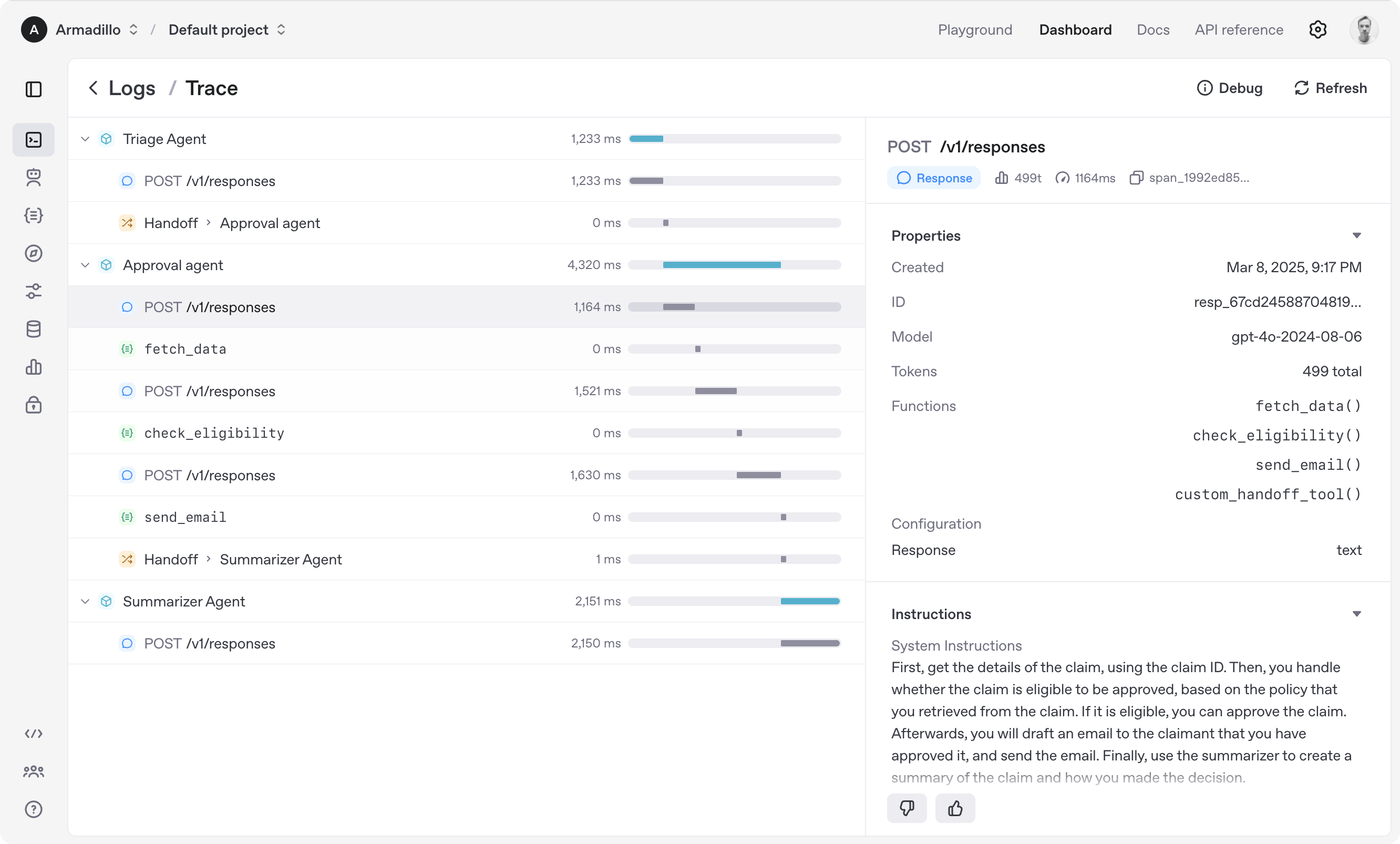
- Tracing: Built-in tracking of agent runs, allowing you to view, debug and optimize your workflows
Explore the examples directory to see the SDK in action, and read our documentation for more details.
Get started
To get started, set up your Python environment (Python 3.10 or newer required), and then install OpenAI Agents SDK package.
venv
python -m venv .venv
source .venv/bin/activate  # On Windows: .venv\Scripts\activate
pip install openai-agents
For voice support, install with the optional voice group: pip install 'openai-agents[voice]'. For Redis session support, install with the optional redis group: pip install 'openai-agents[redis]'.
uv
If you're familiar with uv, installing the package would be even easier:
uv init
uv add openai-agents
For voice support, install with the optional voice group: uv add 'openai-agents[voice]'. For Redis session support, install with the optional redis group: uv add 'openai-agents[redis]'.
Run your first agents
The SDK supports four primary ways to run agents. Set the OPENAI_API_KEY environment variable before running any of these examples.
Run a text agent
Use a text Agent for workflows that do not need a persistent realtime connection or a sandbox workspace.
from agents import Agent, Runner

agent = Agent(name="Assistant", instructions="You are a helpful assistant")

result = Runner.run_sync(agent, "Write a haiku about recursion in programming.")
print(result.final_output)

## Code within the code,
## Functions calling themselves,
## Infinite loop's dance.
(For Jupyter notebook users, see hello_world_jupyter.ipynb)
Run a sandbox agent
Use a SandboxAgent when the agent needs to inspect files, run commands, apply patches, or preserve workspace state across longer tasks.
This example uses UnixLocalSandboxClient, which is supported on macOS and Linux. On Windows, use DockerSandboxClient with the openai-agents[docker] extra or a hosted sandbox client instead; see Sandbox clients for setup details.
from agents import Runner
from agents.run import RunConfig
from agents.sandbox import Manifest, SandboxAgent, SandboxRunConfig
from agents.sandbox.entries import GitRepo
from agents.sandbox.sandboxes import UnixLocalSandboxClient

agent = SandboxAgent(
    name="Workspace Assistant",
    instructions="Inspect the sandbox workspace before answering.",
    default_manifest=Manifest(
        entries={"repo": GitRepo(repo="openai/openai-agents-python", ref="main")}
    ),
)

result = Runner.run_sync(
    agent,
    "Inspect the repo README and summarize what this project does.",
    run_config=RunConfig(sandbox=SandboxRunConfig(client=UnixLocalSandboxClient())),
)
print(result.final_output)
Run a realtime agent
Use a RealtimeAgent for low-latency, server-side voice and multimodal experiences over WebSocket.
import asyncio
from agents.realtime import RealtimeAgent, RealtimeRunner

async def main() -> None:
    agent = RealtimeAgent(
        name="Assistant", instructions="You are a helpful voice assistant. Keep responses short."
    )
    runner = RealtimeRunner(starting_agent=agent)
    session = await runner.run()

    async with session:
        await session.send_message("Say hello in one short sentence.")
        async for event in session:
            if event.type == "audio":
                # Forward or play event.audio.data.
                pass
            elif event.type == "history_added":
                print(event.item)
            elif event.type == "agent_end":
                break

if __name__ == "__main__":
    asyncio.run(main())
Run a voice agent
Use a VoicePipeline to turn audio into text, run an agent workflow, and stream generated speech.
import asyncio

import numpy as np

from agents import Agent
from agents.voice import AudioInput, SingleAgentVoiceWorkflow, VoicePipeline

async def main() -> None:
    agent = Agent(name="Assistant", instructions="You are a helpful voice assistant.")
    pipeline = VoicePipeline(workflow=SingleAgentVoiceWorkflow(agent))
    audio_input = AudioInput(buffer=np.zeros(24000 * 3, dtype=np.int16))

    result = await pipeline.run(audio_input)
    async for event in result.stream():
        if event.type == "voice_stream_event_audio":
            # Forward or play event.data.
            pass

if __name__ == "__main__":
    asyncio.run(main())
Explore the examples directory to see the SDK in action, and read our documentation for more details.
Contributing
Please share bug reports and feature requests through GitHub issues.
Pull requests are limited to repository collaborators; we do not accept pull requests from non-collaborators.
See CONTRIBUTING.md for the contribution policy and development guide.
For security vulnerabilities, follow SECURITY.md.
Acknowledgements
We'd like to acknowledge the excellent work of the open-source community, especially:
This library has these optional dependencies:
We also rely on the following tools to manage the project:
We're committed to continuing to build the Agents SDK as an open source framework so others in the community can expand on our approach.
Questions
- Do Cloudflare Agents SDK and OpenAI Agents SDK (Python) list the same price?
- Both listings report Free. Free to use. Pricing is reported by the maker and is not independently verified.
- Which has more upvotes, Cloudflare Agents SDK or OpenAI Agents SDK (Python)?
- Both have 0 upvotes.
- What does each maker say Cloudflare Agents SDK and OpenAI Agents SDK (Python) are for?
- Cloudflare Agents SDK: SDK for building stateful AI agents on Cloudflare Workers and Durable Objects. OpenAI Agents SDK (Python): Lightweight OpenAI framework for multi-agent workflows with handoffs, guardrails and tracing.
Cloudflare Agents SDK alternatives·OpenAI Agents SDK (Python) alternatives·All coding tools