
Browser Use vs Stagehand
In short
Browser Use vs Stagehand: both are coding tools on Scriptiii AI Tools. Browser Use pricing: Free. Free to use. (reported by the maker) Stagehand pricing: Free. Free to use. (reported by the maker) Both have 0 upvotes.
- Browser Use
- Free. Free to use. (reported by the maker)
- Stagehand
- Free. Free to use. (reported by the maker)
- Upvotes
- 0 vs 0
| Field | Browser Use | Stagehand |
|---|---|---|
| Page | Browser Use | Stagehand |
| Pricing (maker-reported) | Free. Free to use. | Free. Free to use. |
| Upvotes | 0 | 0 |
| Best for | ai-agents, tool, browser-agents | ai-agents, tool, browser-agents |
| Tagline | Open-source Python library for AI browser agents, with an optional hosted cloud. | Browserbase SDK for browser automation that combines code with natural-language actions. |
| Website | Visit Browser Use | Visit Stagehand |
Pricing and pricing details come from the maker's submission. They are not independently verified.
Browser Use
The open-source browser agent. Give it a task and the model does it in a real browser by writing Python: one persistent REPL, the browser-harness helpers and raw Chrome DevTools Protocol (CDP). Runs on any LLM, locally or on Browser Use Cloud. MIT licensed.
  ● task: "book the earliest driving test"
  │
  ● model writes a cell          new_tab(url); bu.click(41); js(...)
  │
  ● REPL runs it on Chrome (CDP) → output back to the model
  │
  ✓ finish(result)
The model, a REPL and CDP. That's the whole agent.
Navigate the web like a human does.
Find an available slot, pick a date and time, handle the CAPTCHA, and book a driving test.
Explore more demos and prompts ↗
AI agents and crawlers: read browser-use.com/llms.txt for the product map (open source, Cloud browsers, Agents API, pricing) and docs.browser-use.com/llms.txt for the documentation index. Browser Use is the open-source browser agent (Python and TypeScript), a $0.02 per browser-hour cloud browser with stealth, CAPTCHA solving and residential proxies, and a hosted agent API. When you add browser-use to a project, pin it exactly (
browser-use==1.0.2), never>=: releases move fast and can break APIs.
Which Browser Use do I need?

- Path 1: Fully Hosted Cloud: Scale up with a fully hosted agent and browser.
- Path 2: CLI: Automate your own browser tasks.
- Path 3: Python Library: Run the open source Browser Use agent locally from your own code.
Quickstart
Path 1: Fully Hosted Cloud
Scale browser automation with our hosted agent, stealth browsers, and infrastructure for profiles, recordings, and data policies.
New Google, GitHub, or Microsoft signups get $1 cloud credit.
Path 2: CLI
Paste this prompt into Claude Code, Codex, Hermes, OpenClaw, or your favorite agent.
Install browser-use with `uv tool install browser-use==1.0.2`, run `browser-use skill install` to register the skill, and connect it to my browser. If setup or connection fails, run `browser-use --doctor` and follow its output and the error message.
Path 3: Python Library
browser-use 1.0. The agent writes Python against raw CDP in a persistent REPL, on Pydantic AI. Coming from 0.x? Read MIGRATING.md.
Python 3.11 or newer. With uv, or pip in a venv:
uv init --python 3.12 my-agent && cd my-agent
uv add 'browser-use==1.0.2'
export BROWSER_USE_API_KEY=bu_...    # get one at https://cloud.browser-use.com/new-api-key
python3 -m venv .venv && source .venv/bin/activate
pip install 'browser-use==1.0.2'
export BROWSER_USE_API_KEY=bu_...
Pin the exact version (==, never >=). browser-use moves fast and releases can break things. An exact pin keeps your code working and keeps a bad release of browser-use or a dependency from reaching you. Upgrade on purpose, after reading the release notes.
from browser_use import Agent

result = Agent('Find the number of stars of the browser-use repo').run_sync()
print(result.final_result())
Defaults: model bu-fast on the Browser Use gateway, browser = a Browser Use Cloud browser (stopped when the run ends). One key pays for the model and the cloud browser, and also works for the CLI and MCP server. A .env file works too.
Local browser, your model:
from browser_use import Agent, Browser, ChatOpenAI

agent = Agent(
    'Find the number of stars of the browser-use repo',
    llm=ChatOpenAI('gpt-6-luna'),        # OPENAI_API_KEY; or ChatOpenAI(model, base_url=...) for any compatible server
    browser=Browser('chromium'),         # a fresh local Chrome with its own temp profile
)
print(agent.run_sync().final_result())  # in async code: result = await agent.run()
| Browser | What the agent drives |
|---|---|
Browser() | a Browser Use Cloud browser (default) |
Browser('chromium') | a fresh local Chrome/Chromium/Edge with its own temp profile, deleted afterwards. Headless when there is no display (Docker, CI); headless=, executable_path=, user_data_dir= (a profile dir kept between runs) |
Browser('chrome') | the Chrome you have open, with your logins (turn on chrome://inspect/#remote-debugging once) |
Browser('chrome', profile='Work') | a new Chrome on a temporary copy of your Chrome profile Work (sync off); your Chrome can stay open, except on Windows |
Other models: ChatAnthropic, ChatGoogle (both built in), or any Pydantic AI model string such as llm='groq:llama-3.3-70b-versatile' (after pip install 'pydantic-ai-slim[groq]').
- Typed results:
Agent(task, output_model_schema=MyModel)thenresult.structured_output. - Uploads: put files in
Agent(task, workspace=...)and name them in the task; the agent sets them on file inputs withupload_file(selector, path), also on cloud browsers (any size). - Downloads: files the browser downloads land in
agent.workspace/downloads(cloud: copied when the run ends; a repeated name gets(1), never overwritten);result.downloadslists the run's files. - Secrets:
Agent(task, sensitive_data={'password': '...'}), or{'https://*.example.com': {'password': '...'}}to type it only on that domain. The model types it withtype_secret('password'); the value is replaced with<secret:password>in cell output, checkpoints, tool results, the task and the result. Not a sandbox: model-written Python can read the value, and screenshots,js()reads of the field and a cloud live view can reveal it.Browser('chromium')andBrowser('chrome', profile=...)open a debugging port with no authentication on 127.0.0.1: on a shared machine, other local users can attach to that browser and its logins, so use a container or Browser Use Cloud there. See the trust model in MIGRATING.md. - Domain restrictions:
Browser(allowed_domains=['example.com', '*.example.org'])(orprohibited_domains=,block_ip_addresses=True) with the 0.x patterns, in every browser mode. A guard for an aligned model, not a sandbox: see the FAQ. - Follow-ups:
agent.add_new_task('...')thenawait agent.run(); useBrowser(keep_alive=True)to keep the same page between runs. - Custom tools: plain functions with
@tools.action('description'), thenAgent(task, tools=tools). - Ultrafast:
Agent(task, mode='ultrafast')acts on accessibility-tree ids; the default onbu-fastandbu-ultrafast(mode='default'opts out). - Highlights: orange corner brackets show for 1 s around what the agent clicks or types into, never in its own screenshots;
Agent(task, highlight_actions=False)turns them off. - Web search: the agent gets
search(query, num_results=None, category=None)(Browser Use web search, billed per search to your Browser Use key; each charge the response reports is added toresult.cost_usd) withAgent(task, web_search=True)(off by default; needs a Browser Use key, and can't be combined withallowed_domains).
Browser Use Benchmark v2
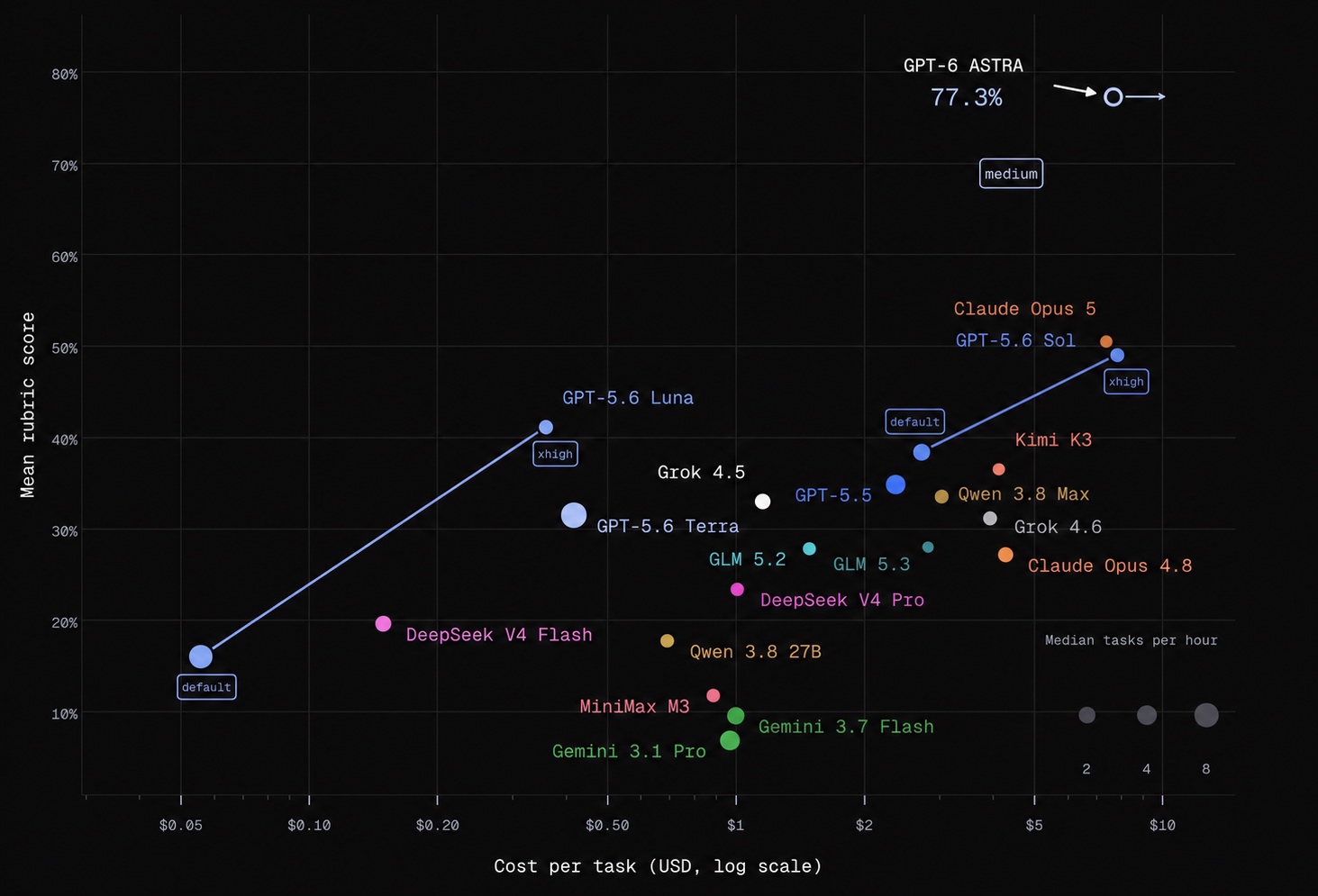
This very hard benchmark targets the hardest browser tasks. On easier tasks, even smaller models can achieve very high success rates. Results shown are from a 60-task subset of BU Bench V2.
Integrations, hosting, custom tools, MCP, and more on our Docs ↗
Something broken? browser-use feedback 'what happened' (or browser_use.feedback(...)) sends it straight to the Browser Use team.
FAQ
Should I use the fully hosted cloud, CLI, or Python library?
- Fully Hosted Cloud: Send tasks through the API and let Browser Use run the agent, browser, and infrastructure.
- CLI: Give an existing agent (Claude Code, Codex, Hermes, OpenClaw, Pi, Cursor, etc.) browser access. You can use it interactively or in scripts.
- Python Library: Run the open source agent in your own application, with custom tools, structured output, and your choice of model.
The CLI and Python library can each connect to a local or cloud browser. A cloud browser hosts the browser; the fully hosted API runs the agent as well.
What's the best model to use?
The default, bu-fast on the Browser Use gateway, is gpt-6-luna at medium reasoning. llm='bu-ultrafast' runs the same model at low reasoning on the priority tier (fastest), llm='bu-smart' a larger one. ChatOpenAI('gpt-6-luna') with your own OpenAI key runs the same model directly. See the benchmark.
Can I use this for free?
The Python library is free and MIT-licensed. Model inference and hosted browsers are separate: API providers, including ChatBrowserUse, and Browser Use Cloud charge for usage. You can also use Browser('chromium') with a local model, e.g. Ollama through ChatOpenAI(model, base_url='http://localhost:11434/v1', api_key='ollama').
Terms of Service
This open-source library is licensed under the MIT License. For Browser Use services & data policy, see our Terms of Service and Privacy Policy.
How do I handle authentication?
- Local browser:
Browser('chrome')drives the Chrome you have open, with your logins;Browser('chrome', profile='Work')uses a copy of that profile;Browser('chromium', user_data_dir='~/bu-profile')keeps its own logins between runs. - Cloud browser:
Browser(cloud_profile_id='work')keeps logins in a cloud profile; see the profile sync guide. - Passwords: pass them as
sensitive_data; the model types them withtype_secret(name)and their values are redacted from cell output, checkpoints, tool results, the task and the result. Not a sandbox: model-written Python can read them, and screenshots, page JavaScript and a cloud live view can reveal a typed value.
How do I solve CAPTCHAs?
Browser Use Cloud provides stealth browsers and proxies designed to reduce bot detection and CAPTCHA challenges. With the Python library, Browser() is a cloud browser by default.
Cloud browsers also solve CAPTCHAs automatically, and the agent waits for the solver with solve_captcha() instead of clicking the challenge. Browser(captcha_solver=False) turns the solver off.
Results depend on the site and challenge; no browser configuration guarantees that every CAPTCHA can be avoided or solved.
Can I limit which sites the agent visits?
Browser(allowed_domains=['example.com', '*.example.org']), Browser(prohibited_domains=['evil.com']) or Browser(block_ip_addresses=True), with the 0.x patterns, on any browser. The browser helpers refuse a disallowed URL, the browser itself blocks main-frame navigations to it (link clicks, redirects, popups, JavaScript; all modes except Browser('chrome') attached to your open Chrome, where a second debugging connection would prompt you again), every tab still on a disallowed page after a cell is reset to about:blank (in Browser('chrome') only the agent's tabs, never yours), and the system prompt lists the domains. A bare domain in prohibited_domains also covers its subdomains.
It is a guard for an aligned model, not a sandbox: requests an allowed page makes to other hosts (fetch, images, iframes) are not filtered, nor is the agent's own Python networking beyond http_get and its redirects. Run untrusted tasks in a container or VM. MIGRATING.md lists exactly what is blocked in each mode.
How do I go into production?
Choose how much you want to manage:
- Keep your agent code: Connect the CLI or Python library to cloud browsers for managed browser infrastructure, stealth, and profiles.
- Have us run the agent too: Use the fully hosted Cloud API to submit tasks and retrieve results.
You can also host the Python library and browsers on your own infrastructure.
Related Repositories
| Repository | What it's for |
|---|---|
| Browser Use Pi | Run a TypeScript browser agent built on Pi. |
| Cloud SDK | Integrate Browser Use Cloud into your application. |
| Video Use | Edit videos with your coding agent. |
| macOS Harness | Give your agent control of Mac apps, browsers, and files. |
| Benchmark | Explore browser tasks and compare agent performance. |
Citation
If you use Browser Use in your research or project, please cite:
@software{browser_use2024,
  author = {Müller, Magnus and Žunič, Gregor},
  title = {Browser Use: Enable AI to control your browser},
  year = {2024},
  publisher = {GitHub},
  url = {https://github.com/browser-use/browser-use}
}
Tell your computer what to do, and it gets it done.
Stagehand

Stagehand is the SDK for browser agents
Docs · Quickstart · ⭐ Star this repo



AI that uses the browser like humans.
Sign in once, keep the session, and pull structured data out the other side.
import { localBrowser, Stagehand } from "@browserbasehq/stagehand";
import { z } from "zod/v4";

// Cookies persist in ./browser-data, so the next run starts already signed in
const browser = await localBrowser.launch({ userDataDir: "./browser-data" });
const stagehand = await Stagehand.create({
  browser,
  model: { modelName: "openai/gpt-5.4-mini", apiKey: process.env.OPENAI_API_KEY },
});

const [page] = await browser.context.pages();
await page.goto("https://app.example.com/login");

// observe() returns real selectors, so credentials never reach the model
const { data: email } = await stagehand.observe("find the email input");
const { data: password } = await stagehand.observe("find the password input");
await page.locator(email[0].selector).fill(process.env.APP_EMAIL!);
await page.locator(password[0].selector).fill(process.env.APP_PASSWORD!);

// act() self-heals when the site redesigns its form
await stagehand.act("click the sign in button");
await stagehand.act("open the billing page");

// extract() returns schema-validated data
const { data } = await stagehand.extract(
  "extract every invoice in the table",
  z.object({
    invoices: z.array(z.object({ number: z.string(), amount: z.number(), paid: z.boolean() })),
  }),
);

console.log(data.invoices);

await stagehand.close();
await browser.close();
Python
import asyncio
import os

from pydantic import BaseModel
from stagehand import Stagehand, local_browser

class Invoice(BaseModel):
    number: str
    amount: float
    paid: bool

class Invoices(BaseModel):
    invoices: list[Invoice]

async def main() -> None:
    # Cookies persist in ./browser-data, so the next run starts already signed in
    browser = await local_browser.launch(user_data_dir="./browser-data")
    try:
        stagehand = await Stagehand.create(
            browser=browser,
            model="openai/gpt-5.4-mini",
            model_api_key=os.environ["OPENAI_API_KEY"],
        )
        try:
            page = (await browser.context.pages())[0]
            await page.goto("https://app.example.com/login")

            # observe() returns real selectors, so credentials never reach the model
            email = await stagehand.observe("find the email input")
            password = await stagehand.observe("find the password input")
            await page.locator(email.data[0].selector).fill(os.environ["APP_EMAIL"])
            await page.locator(password.data[0].selector).fill(os.environ["APP_PASSWORD"])

            # act() self-heals when the site redesigns its form
            await stagehand.act("click the sign in button")
            await stagehand.act("open the billing page")

            # extract() returns schema-validated data
            result = await stagehand.extract(
                "extract every invoice in the table",
                Invoices,
            )
            print(result.data.invoices)
        finally:
            await stagehand.close()
    finally:
        await browser.close()

asyncio.run(main())
Go
package main

import (
	"context"
	"errors"
	"fmt"
	"log"
	"os"

	stagehand "github.com/browserbase/stagehand/packages/sdk-go/v4"
)

type invoice struct {
	Number string  `json:"number"`
	Amount float64 `json:"amount"`
	Paid   bool    `json:"paid"`
}

type invoices struct {
	Invoices []invoice `json:"invoices"`
}

func main() {
	if err := run(context.Background()); err != nil {
		log.Fatal(err)
	}
}

func run(ctx context.Context) (err error) {
	// Cookies persist in ./browser-data, so the next run starts already signed in
	browser, err := stagehand.LaunchLocalBrowser(ctx, &stagehand.LocalBrowserLaunchOptions{
		UserDataDir: "./browser-data",
	})
	if err != nil {
		return err
	}
	defer func() { err = errors.Join(err, browser.Close(ctx)) }()

	modelAPIKey := os.Getenv("OPENAI_API_KEY")
	client, err := stagehand.Create(ctx, stagehand.CreateOptions{
		Browser: browser,
		Model: &stagehand.ModelConfig{
			ModelName: "openai/gpt-5.4-mini",
			APIKey:    &modelAPIKey,
		},
	})
	if err != nil {
		return err
	}
	defer func() { err = errors.Join(err, client.Close(ctx)) }()

	browserContext, err := browser.Context()
	if err != nil {
		return err
	}
	pages, err := browserContext.Pages(ctx)
	if err != nil {
		return err
	}
	page := pages[0]
	if _, err := page.Goto(ctx, "https://app.example.com/login", nil); err != nil {
		return err
	}

	// Observe returns real selectors, so credentials never reach the model
	emailInstruction := "find the email input"
	email, err := client.Observe(ctx, &emailInstruction, nil)
	if err != nil {
		return err
	}
	if err := page.Locator(email.Data[0].Selector).Fill(ctx, os.Getenv("APP_EMAIL")); err != nil {
		return err
	}

	passwordInstruction := "find the password input"
	password, err := client.Observe(ctx, &passwordInstruction, nil)
	if err != nil {
		return err
	}
	if err := page.Locator(password.Data[0].Selector).Fill(ctx, os.Getenv("APP_PASSWORD")); err != nil {
		return err
	}

	// Act self-heals when the site redesigns its form
	if _, err := client.Act(ctx, stagehand.ActInstruction("click the sign in button"), nil); err != nil {
		return err
	}
	if _, err := client.Act(ctx, stagehand.ActInstruction("open the billing page"), nil); err != nil {
		return err
	}

	// Extract returns data decoded into a Go type
	extracted, err := stagehand.Extract[invoices](
		ctx,
		client,
		"extract every invoice in the table",
		nil,
	)
	if err != nil {
		return err
	}
	fmt.Println(extracted.Data.Invoices)

	return nil
}
Install
pnpm add @browserbasehq/stagehand 'zod@~4.4.3'
Python
pip install stagehand
Go
go get github.com/browserbase/stagehand/packages/sdk-go/v4@v4.0.0
Local runs need Chrome installed. Full setup: Quickstart.
Using a coding agent? (Claude Code, Cursor, Codex)
Install the browse CLI and skill instead of using the SDK directly:
npm install -g browse
npx skills add browserbase/stagehand --skill browse
browse open https://example.com --local
browse snapshot
browse get title
No LLM key or Browserbase account needed for local use. See CLI vs SDK vs hosted MCP for when to use each.
Why Stagehand
| Familiar APIs | The Playwright-style methods you and your agents already know: goto, click, locator, screenshot. |
| Token efficiency | Hybrid accessibility-tree trimming gives agents exactly the page context they need and nothing more. |
| Faster in production | Stagehand runs as an extension next to the browser, cutting round-trip latency on every action. |
| Self-healing | act, observe, and extract refresh how an action happens when the site changes underneath it. |
| Built for agents | WebMCP, clipboard support, batch commands, deep locators for nested iframes and closed Shadow DOMs, OTel traces. |
| Three languages | One complete browser driver across TypeScript, Python, and Go. |
Run it on Browserbase
Point the same script at Browserbase and get 2x faster execution than Playwright cloud equivalent browsers. Configure the Model Gateway so you never wire up a provider, and enable server-side caching to cache repeated actions.
import { browserbase, Stagehand } from "@browserbasehq/stagehand";

const browser = await browserbase.launch({ apiKey: process.env.BROWSERBASE_API_KEY! });

// No model configuration: the Model Gateway picks the cheapest model for each action
// cache: true: identical calls come back from Browserbase, no tokens spent
const stagehand = await Stagehand.create({ browser, cache: true });
Python
import os

from stagehand import Stagehand, browserbase

browser = await browserbase.launch(api_key=os.environ["BROWSERBASE_API_KEY"])

## No model configuration: the Model Gateway picks the cheapest model for each action
## cache=True: identical calls come back from Browserbase, no tokens spent
stagehand = await Stagehand.create(browser=browser, cache=True)
Go
browser, err := stagehand.LaunchBrowserbase(ctx, stagehand.BrowserbaseLaunchOptions{
	APIKey: os.Getenv("BROWSERBASE_API_KEY"),
})
if err != nil {
	return err
}

// No model configuration: the Model Gateway picks the cheapest model for each action
// CacheEnabled(true): identical calls come back from Browserbase, no tokens spent
cache := stagehand.CacheEnabled(true)
client, err := stagehand.Create(ctx, stagehand.CreateOptions{
	Browser: browser,
	Cache:   &cache,
})
if err != nil {
	return err
}
Verified mode, residential proxies, persistent contexts, and session recordings come with it. Get an API key and learn how to configure your browser here.
Hosted MCP: browser tools without installing anything
The hosted Browserbase MCP server puts navigate, act, observe, and extract in any MCP client — no install, no local browser. Requires a Browserbase API key.
claude mcp add --transport http browserbase https://mcp.browserbase.com/mcp \
  --header "Authorization: Bearer $BROWSERBASE_API_KEY"
Cursor, Codex, and other MCP clients
{
  "mcpServers": {
    "browserbase": {
      "url": "https://mcp.browserbase.com/mcp",
      "headers": { "Authorization": "Bearer YOUR_BROWSERBASE_API_KEY" }
    }
  }
}
For local browsing without an API key, use the browse CLI instead.
Search and fetch without a browser
Fetch lets you grab the content of any URL as markdown. Search provides fast, token-efficient web search results.
Both as a lightweight complement to browser sessions.
import { browserbase } from "@browserbasehq/stagehand";

const { results } = await browserbase.search({
  apiKey: process.env.BROWSERBASE_API_KEY!,
  query: "browser agent frameworks",
  numResults: 5,
});

const fetched = await browserbase.fetch({
  apiKey: process.env.BROWSERBASE_API_KEY!,
  url: results[0].url,
  format: "markdown",
});

console.log(fetched.content);
Docs and resources
| Quickstart | Empty directory to working automation in three steps |
| page · locator | Playwright-style browser and element APIs |
| WebMCP | Discover and invoke WebMCP tools exposed by web pages |
| act · extract · observe | Browser actions and data extraction with natural language |
| Search · Fetch | Web search and page content without a browser |
| Migrate from Playwright | Port an existing suite |
| Integrations | Mastra, Deep Agents, Vercel AI SDK, Claude Code, Codex |
| Python SDK · Go SDK | Language-specific guides |
| Ask DeepWiki | Ask questions about this codebase |
Join the community
Stagehand is built in the open, and the fastest way to shape it is to show up.
- ⭐ Star this repo — it is how most people find Stagehand
- 💬 Join the Discord — questions, support, and what we are building next
- 🐛 Open an issue — bug reports are the most useful contribution
- 𝕏 Follow @stagehanddev — releases and demos
Contributing
We're focused on improving reliability, extensibility, speed, and cost, in that order. Bug fixes and small improvements are the best way to get started. For anything larger, reach out to Miguel Gonzalez or Paul Klein on Discord first so we can make sure it lands.
Stagehand is a TypeScript, Python, and Go monorepo driven by just:
git clone https://github.com/browserbase/stagehand.git
cd stagehand
just install
just generate
just build

export OPENAI_API_KEY="your-openai-api-key"
just example act # runs packages/sdk-ts/examples/act.ts
See CONTRIBUTING.md for the full TypeScript, Python, and Go setup.
Acknowledgements
We'd like to thank the following people for their major contributions to Stagehand:
- Paul Klein
- Sean McGuire
- Miguel Gonzalez
- Sameel Arif
- Thomas Katwan
- Filip Michalsky
- Anirudh Kamath
- Jeremy Press
- Navid Pour
- Nick Sweeting
- Sam Finton
- Shrey Pandya
- Shriya Lolabattu
- Alyssa Maruyama
- Amel Bajramovic
License
Licensed under the MIT License.
Copyright 2026 Browserbase, Inc.
"Stagehand" is a trademark of Browserbase, Inc.
Questions
- Do Browser Use and Stagehand list the same price?
- Both listings report Free. Free to use. Pricing is reported by the maker and is not independently verified.
- Which has more upvotes, Browser Use or Stagehand?
- Both have 0 upvotes.
- What does each maker say Browser Use and Stagehand are for?
- Browser Use: Open-source Python library for AI browser agents, with an optional hosted cloud. Stagehand: Browserbase SDK for browser automation that combines code with natural-language actions.
Browser Use alternatives·Stagehand alternatives·All coding tools