The open-source browser agent. Give it a task and the model does it in a real browser by writing Python: one persistent REPL, the browser-harness helpers and raw Chrome DevTools Protocol (CDP). Runs on any LLM, locally or on Browser Use Cloud. MIT licensed.
  ● task: "book the earliest driving test"
  │
  ● model writes a cell          new_tab(url); bu.click(41); js(...)
  │
  ● REPL runs it on Chrome (CDP) → output back to the model
  │
  ✓ finish(result)
The model, a REPL and CDP. That's the whole agent.
Navigate the web like a human does.
Find an available slot, pick a date and time, handle the CAPTCHA, and book a driving test.
AI agents and crawlers: read browser-use.com/llms.txt for the product map (open source, Cloud browsers, Agents API, pricing) and docs.browser-use.com/llms.txt for the documentation index. Browser Use is the open-source browser agent (Python and TypeScript), a $0.02 per browser-hour cloud browser with stealth, CAPTCHA solving and residential proxies, and a hosted agent API. When you add browser-use to a project, pin it exactly (browser-use==1.0.2), never >=: releases move fast and can break APIs.
New Google, GitHub, or Microsoft signups get $1 cloud credit.
Path 2: CLI
Paste this prompt into Claude Code, Codex, Hermes, OpenClaw, or your favorite agent.
Install browser-use with `uv tool install browser-use==1.0.2`, run `browser-use skill install` to register the skill, and connect it to my browser. If setup or connection fails, run `browser-use --doctor` and follow its output and the error message.
Path 3: Python Library
browser-use 1.0. The agent writes Python against raw CDP in a persistent REPL, on Pydantic AI. Coming from 0.x? Read MIGRATING.md.
Python 3.11 or newer. With uv, or pip in a venv:
uv init --python 3.12 my-agent && cd my-agent
uv add 'browser-use==1.0.2'
export BROWSER_USE_API_KEY=bu_...    # get one at https://cloud.browser-use.com/new-api-key
Pin the exact version (==, never >=). browser-use moves fast and releases can break things. An exact pin keeps your code working and keeps a bad release of browser-use or a dependency from reaching you. Upgrade on purpose, after reading the release notes.
from browser_use import Agent

result = Agent('Find the number of stars of the browser-use repo').run_sync()
print(result.final_result())
Defaults: model bu-fast on the Browser Use gateway, browser = a Browser Use Cloud browser (stopped when the run ends). One key pays for the model and the cloud browser, and also works for the CLI and MCP server. A .env file works too.
Local browser, your model:
from browser_use import Agent, Browser, ChatOpenAI

agent = Agent(
    'Find the number of stars of the browser-use repo',
    llm=ChatOpenAI('gpt-6-luna'),        # OPENAI_API_KEY; or ChatOpenAI(model, base_url=...) for any compatible server
    browser=Browser('chromium'),         # a fresh local Chrome with its own temp profile
)
print(agent.run_sync().final_result())  # in async code: result = await agent.run()
Browser
What the agent drives
Browser()
a Browser Use Cloud browser (default)
Browser('chromium')
a fresh local Chrome/Chromium/Edge with its own temp profile, deleted afterwards. Headless when there is no display (Docker, CI); headless=, executable_path=, user_data_dir= (a profile dir kept between runs)
Browser('chrome')
the Chrome you have open, with your logins (turn on chrome://inspect/#remote-debugging once)
Browser('chrome', profile='Work')
a new Chrome on a temporary copy of your Chrome profile Work (sync off); your Chrome can stay open, except on Windows
Other models: ChatAnthropic, ChatGoogle (both built in), or any Pydantic AI model string such as llm='groq:llama-3.3-70b-versatile' (after pip install 'pydantic-ai-slim[groq]').
Typed results:Agent(task, output_model_schema=MyModel) then result.structured_output.
Uploads: put files in Agent(task, workspace=...) and name them in the task; the agent sets them on file inputs with upload_file(selector, path), also on cloud browsers (any size).
Downloads: files the browser downloads land in agent.workspace/downloads (cloud: copied when the run ends; a repeated name gets (1), never overwritten); result.downloads lists the run's files.
Secrets:Agent(task, sensitive_data={'password': '...'}), or {'https://*.example.com': {'password': '...'}} to type it only on that domain. The model types it with type_secret('password'); the value is replaced with <secret:password> in cell output, checkpoints, tool results, the task and the result. Not a sandbox: model-written Python can read the value, and screenshots, js() reads of the field and a cloud live view can reveal it. Browser('chromium') and Browser('chrome', profile=...) open a debugging port with no authentication on 127.0.0.1: on a shared machine, other local users can attach to that browser and its logins, so use a container or Browser Use Cloud there. See the trust model in MIGRATING.md.
Domain restrictions:Browser(allowed_domains=['example.com', '*.example.org']) (or prohibited_domains=, block_ip_addresses=True) with the 0.x patterns, in every browser mode. A guard for an aligned model, not a sandbox: see the FAQ.
Follow-ups:agent.add_new_task('...') then await agent.run(); use Browser(keep_alive=True) to keep the same page between runs.
Custom tools: plain functions with @tools.action('description'), then Agent(task, tools=tools).
Ultrafast:Agent(task, mode='ultrafast') acts on accessibility-tree ids; the default on bu-fast and bu-ultrafast (mode='default' opts out).
Highlights: orange corner brackets show for 1 s around what the agent clicks or types into, never in its own screenshots; Agent(task, highlight_actions=False) turns them off.
Web search: the agent gets search(query, num_results=None, category=None) (Browser Use web search, billed per search to your Browser Use key; each charge the response reports is added to result.cost_usd) with Agent(task, web_search=True) (off by default; needs a Browser Use key, and can't be combined with allowed_domains).
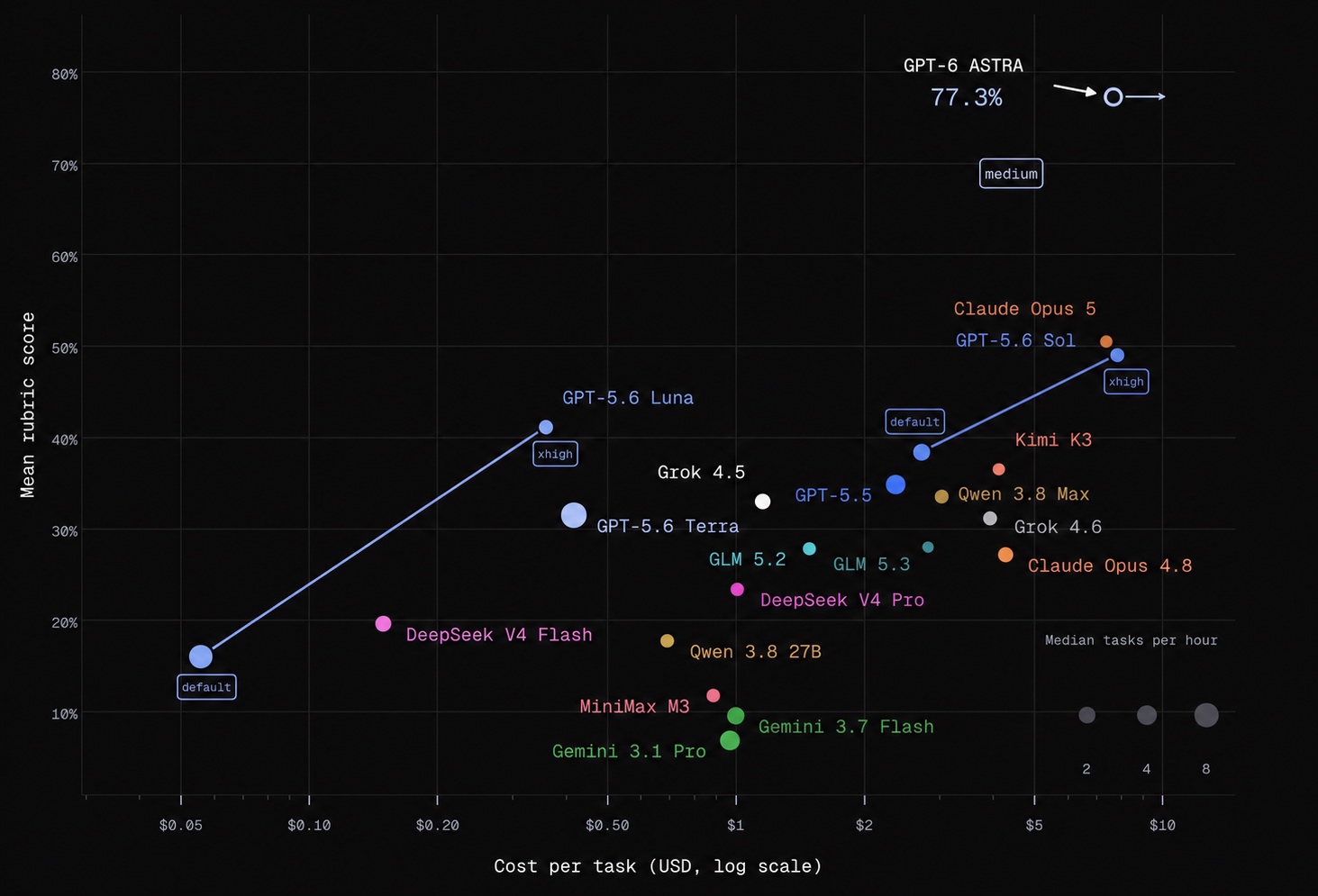
Browser Use Benchmark v2
This very hard benchmark targets the hardest browser tasks. On easier tasks, even smaller models can achieve very high success rates. Results shown are from a 60-task subset of BU Bench V2.
Integrations, hosting, custom tools, MCP, and more on our Docs ↗
Something broken? browser-use feedback 'what happened' (or browser_use.feedback(...)) sends it straight to the Browser Use team.
FAQ
Should I use the fully hosted cloud, CLI, or Python library?
Fully Hosted Cloud: Send tasks through the API and let Browser Use run the agent, browser, and infrastructure.
CLI: Give an existing agent (Claude Code, Codex, Hermes, OpenClaw, Pi, Cursor, etc.) browser access. You can use it interactively or in scripts.
Python Library: Run the open source agent in your own application, with custom tools, structured output, and your choice of model.
The CLI and Python library can each connect to a local or cloud browser. A cloud browser hosts the browser; the fully hosted API runs the agent as well.
What's the best model to use?
The default, bu-fast on the Browser Use gateway, is gpt-6-luna at medium reasoning. llm='bu-ultrafast' runs the same model at low reasoning on the priority tier (fastest), llm='bu-smart' a larger one. ChatOpenAI('gpt-6-luna') with your own OpenAI key runs the same model directly. See the benchmark.
Can I use this for free?
The Python library is free and MIT-licensed. Model inference and hosted browsers are separate: API providers, including ChatBrowserUse, and Browser Use Cloud charge for usage. You can also use Browser('chromium') with a local model, e.g. Ollama through ChatOpenAI(model, base_url='http://localhost:11434/v1', api_key='ollama').
Terms of Service
This open-source library is licensed under the MIT License. For Browser Use services & data policy, see our Terms of Service and Privacy Policy.
How do I handle authentication?
Local browser:Browser('chrome') drives the Chrome you have open, with your logins; Browser('chrome', profile='Work') uses a copy of that profile; Browser('chromium', user_data_dir='~/bu-profile') keeps its own logins between runs.
Cloud browser:Browser(cloud_profile_id='work') keeps logins in a cloud profile; see the profile sync guide.
Passwords: pass them as sensitive_data; the model types them with type_secret(name) and their values are redacted from cell output, checkpoints, tool results, the task and the result. Not a sandbox: model-written Python can read them, and screenshots, page JavaScript and a cloud live view can reveal a typed value.
How do I solve CAPTCHAs?
Browser Use Cloud provides stealth browsers and proxies designed to reduce bot detection and CAPTCHA challenges. With the Python library, Browser() is a cloud browser by default.
Cloud browsers also solve CAPTCHAs automatically, and the agent waits for the solver with solve_captcha() instead of clicking the challenge. Browser(captcha_solver=False) turns the solver off.
Results depend on the site and challenge; no browser configuration guarantees that every CAPTCHA can be avoided or solved.
Can I limit which sites the agent visits?
Browser(allowed_domains=['example.com', '*.example.org']), Browser(prohibited_domains=['evil.com']) or Browser(block_ip_addresses=True), with the 0.x patterns, on any browser. The browser helpers refuse a disallowed URL, the browser itself blocks main-frame navigations to it (link clicks, redirects, popups, JavaScript; all modes except Browser('chrome') attached to your open Chrome, where a second debugging connection would prompt you again), every tab still on a disallowed page after a cell is reset to about:blank (in Browser('chrome') only the agent's tabs, never yours), and the system prompt lists the domains. A bare domain in prohibited_domains also covers its subdomains.
It is a guard for an aligned model, not a sandbox: requests an allowed page makes to other hosts (fetch, images, iframes) are not filtered, nor is the agent's own Python networking beyond http_get and its redirects. Run untrusted tasks in a container or VM. MIGRATING.md lists exactly what is blocked in each mode.
How do I go into production?
Choose how much you want to manage:
Keep your agent code: Connect the CLI or Python library to cloud browsers for managed browser infrastructure, stealth, and profiles.
Have us run the agent too: Use the fully hosted Cloud API to submit tasks and retrieve results.
You can also host the Python library and browsers on your own infrastructure.
Explore browser tasks and compare agent performance.
Citation
If you use Browser Use in your research or project, please cite:
@software{browser_use2024,
  author = {Müller, Magnus and Žunič, Gregor},
  title = {Browser Use: Enable AI to control your browser},
  year = {2024},
  publisher = {GitHub},
  url = {https://github.com/browser-use/browser-use}
}
Tell your computer what to do, and it gets it done.
Made with ❤️ in Zurich and San Francisco
At a glance
Category
Coding
Pricing model
Free
Best for
ai-agents, tool, browser-agents
What is Browser Use? Browser Use is a coding tool listed on Scriptiii AI Tools. Open-source Python library for AI browser agents, with an optional hosted cloud. Pricing: Free. Free to use. Best for: ai-agents, tool, browser-agents.
Questions & answers
Everything you need to know about Browser Use
What is Browser Use?
Browser Use is a coding tool. Open-source Python library for AI browser agents, with an optional hosted cloud.
What does Browser Use cost?
Free. Free to use.
What is Browser Use best for?
ai-agents, tool, browser-agents. It is filed under Coding.